Forge App for Jira
CogniRunner
Add AI validators, conditions, and post-functions to Jira workflows — in plain English.
Overview
A semantic layer for Jira workflows. Native Jira validators only check structure — required, not empty, matches a regex. CogniRunner checks meaning: it sends field content, attachments, and related issues to an AI model and evaluates them against criteria you describe in plain English — then validates, decides, and acts on every transition. Four rule types cover the full loop, and configuring one takes about thirty seconds: pick a field, write what “valid” means, save.
Validators
Block a transition when field content fails your rule, showing the user the AI's reasoning.
Conditions
Hide a transition entirely when criteria aren't met — the user never sees the button.
Semantic Post-Functions
After a transition, the AI reads a field, decides, and writes a target field — e.g. summarize work into Release Notes.
Static Post-Functions
AI generates JavaScript once, then runs it at zero AI cost on every transition — chain up to 50 sandboxed steps.
CogniRunner works across company-managed and team-managed Jira projects, supports all standard and custom Jira field types, analyzes the content of attached files and images, and runs on your choice of AI provider — bring your own key, or use the zero-key Atlassian Forge LLM.
The shift in one line: rules you used to enforce with reviewer eyeballs or brittle ScriptRunner code — “is this bug report actually reproducible?”, “is this a duplicate?” — now run automatically, on every transition, described in the same plain English you'd use to explain them to a teammate.
Why teams choose CogniRunner
Jira already has ways to gate a transition. Here's honestly where each one fits — and the gap CogniRunner fills.
Native Jira validators
Good at
Fast, free, structural gates — required fields, regex, not-empty, field-equals-value.
Where it stops
Blind to meaning. They can confirm a description exists; they can't tell a real bug report from "it's broken pls fix."
ScriptRunner & friends
Good at
Powerful, deterministic scripted logic for teams that have the Groovy/JS skills and the appetite to maintain it.
Where it stops
You write and own the code. Semantic judgment ("is this acceptance criteria testable?") is hard to express as a script at all.
CogniRunner
Good at
Plain-English rules an AI understands. No code, no regex. Open source, runs on Forge, bring your own AI key.
And then some
Reads meaning across fields, attachments, and related issues — and explains its decision back to the user in their own terms.
Plain English, not code
Describe the rule the way you'd explain it to a new hire. No Groovy, no regex, nothing to maintain when requirements change.
Decisions you can read
Every block, skip, or update comes with the AI's reasoning — visible to the user and saved in the log. No silent black box.
Your key, your data, your control
Bring your own AI provider, or keep everything inside Atlassian with the zero-key Forge LLM. Content goes only where you point it.
Open source, no lock-in
AGPL-3.0, full source on GitHub. Audit it, self-host it, or fork it — the rules you write are never trapped behind a vendor.
What you can actually do with it
Concrete jobs CogniRunner does on day one — each is a single plain-English rule on a transition.
Definition of Done enforcement
Block "In Progress → Done" until the description, acceptance criteria, and test evidence are genuinely present — not just non-empty.
So that Reviewers stop bouncing tickets back for missing basics; the gate does it the moment someone tries to move the card.
Duplicate triage
On new bugs, have the AI search the project for similar reports and block with the matching issue key when it finds one.
So that Fewer duplicate tickets reaching the backlog, and the reporter sees exactly which existing issue to follow instead.
Release-notes automation
When an issue hits Done, summarize the work into a customer-facing Release Notes field automatically.
So that Release notes write themselves as work completes, instead of being reverse-engineered from commits at ship time.
PII & compliance gate
Reject transitions when a field — or an attached document or screenshot — contains PII, secrets, or placeholder text like "TBD".
So that Sensitive data is caught at the workflow boundary, not in a quarterly audit after it's already shared.
Bug-report quality bar
Require steps to reproduce, expected vs. actual behavior, and an affected component before a bug can leave triage.
So that Engineers receive bugs they can actually act on, cutting the back-and-forth that stalls the first day of every fix.
Spec & attachment review
Confirm an attached spec, mockup, or contract is the real thing and covers the required sections — reading the file, not the filename.
So that "Looks done" stops meaning "a file is attached" and starts meaning "the right, complete file is attached."
Getting Started
CogniRunner integrates into Jira's native workflow editor. Add a validator or condition in three steps.
1
Open the Workflow Editor
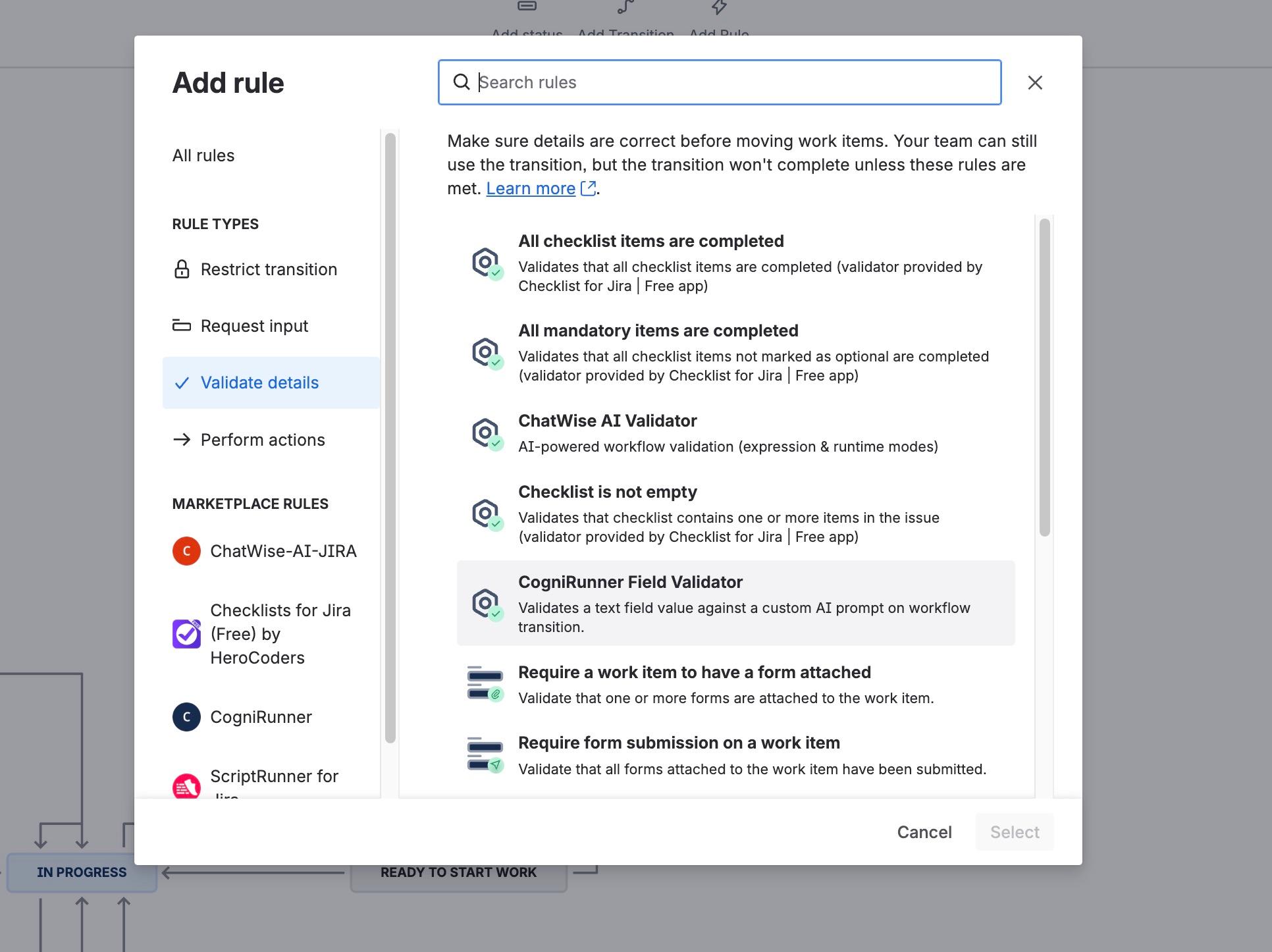
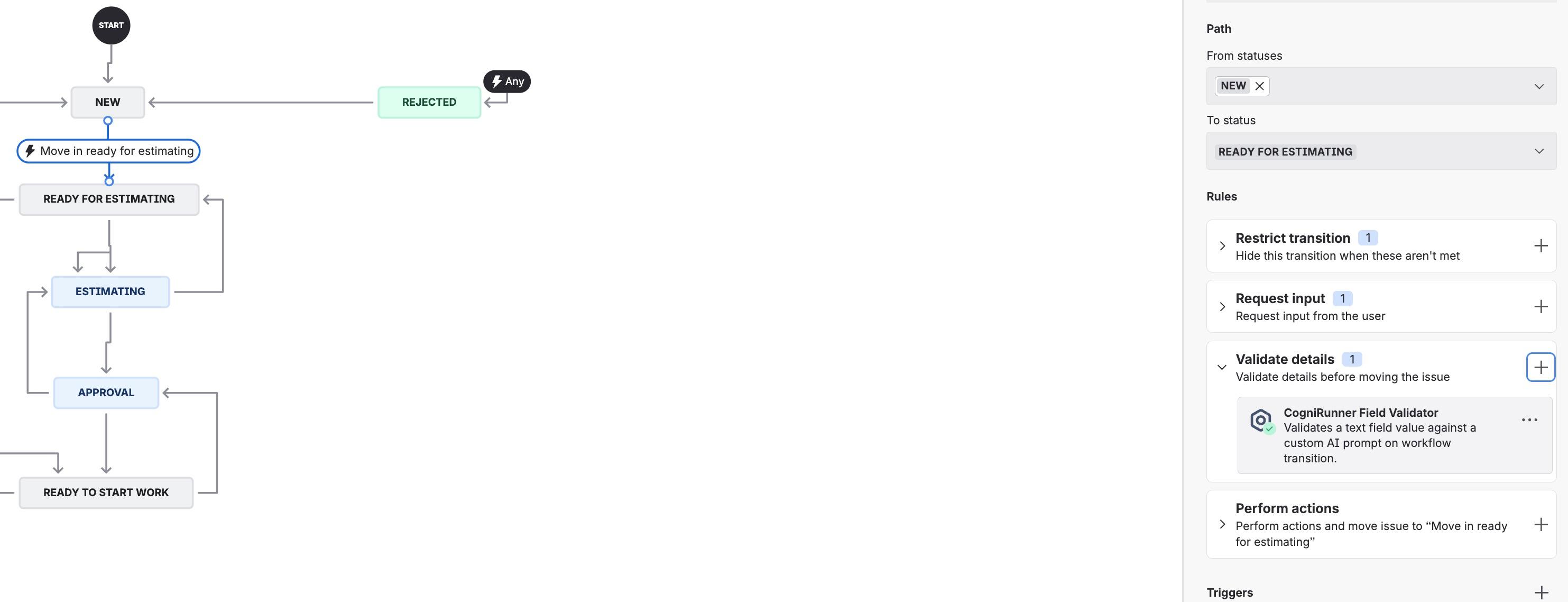
Select a transition and click the Rules panel on the right side. You'll see rule categories: Restrict transition, Request input, Validate details, and Perform actions.
2
Add a New Rule
Click the + button next to "Validate details" (for validators) or "Restrict transition" (for conditions). Find CogniRunner Field Validator under Marketplace Rules.
3
Pick a type & configure
Choose a validator, condition, or post-function. Select the field, write your prompt in plain English, optionally attach context docs, and save. Prefer not to touch the workflow editor? Use + Add Rule in the admin panel's guided wizard.
Configuring a Validator or Condition
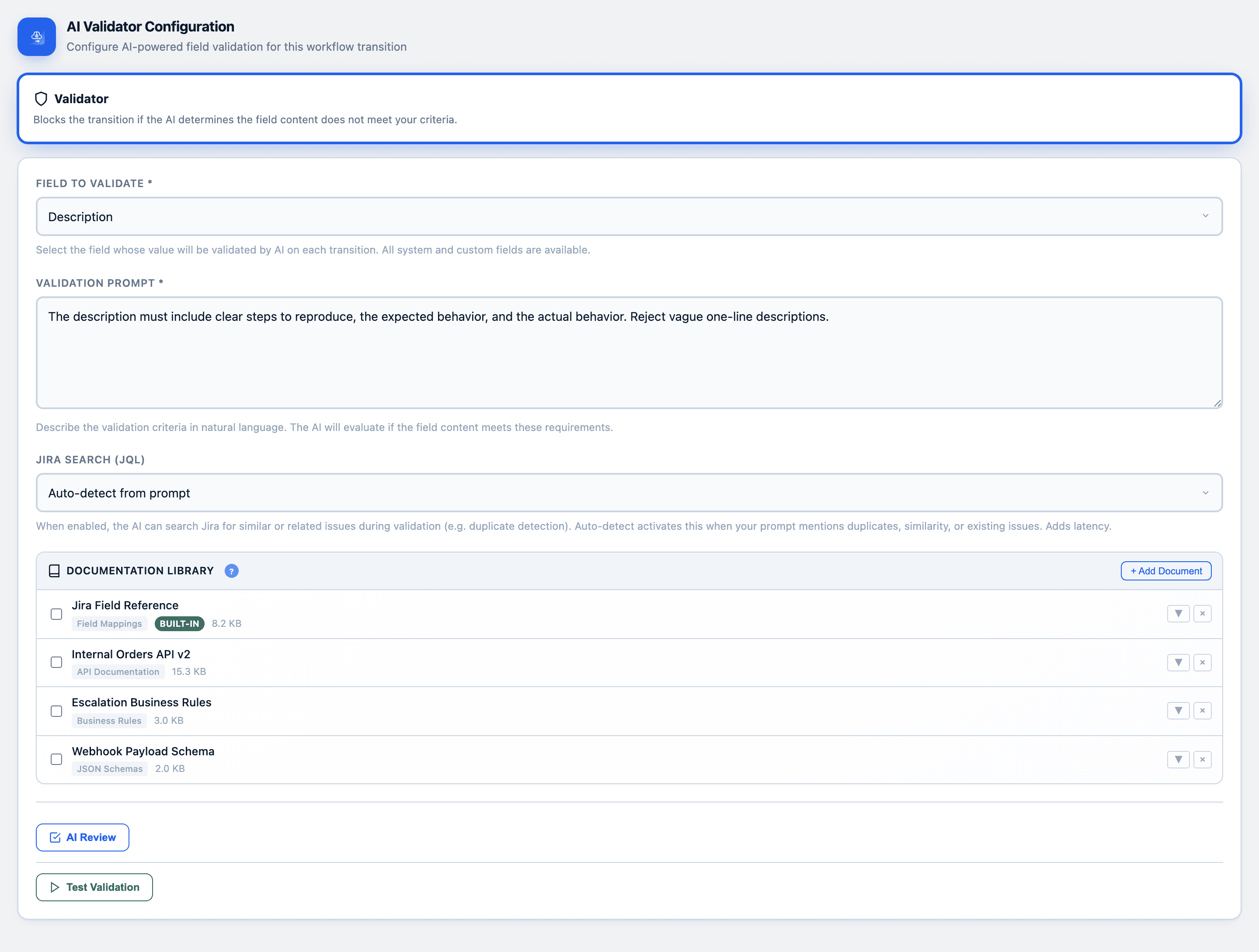
When you add or edit a CogniRunner rule, you'll see the configuration form with three settings.
Field to Validate
Which Jira field the AI should evaluate
Validation Prompt
Your criteria described in natural language
Jira Search (JQL)
Optional duplicate detection via JQL queries
Field Selector
The field selector dropdown shows all fields available on your project's edit/view screens, grouped by system fields and custom fields. Each entry shows the field name, its internal ID, and its type.
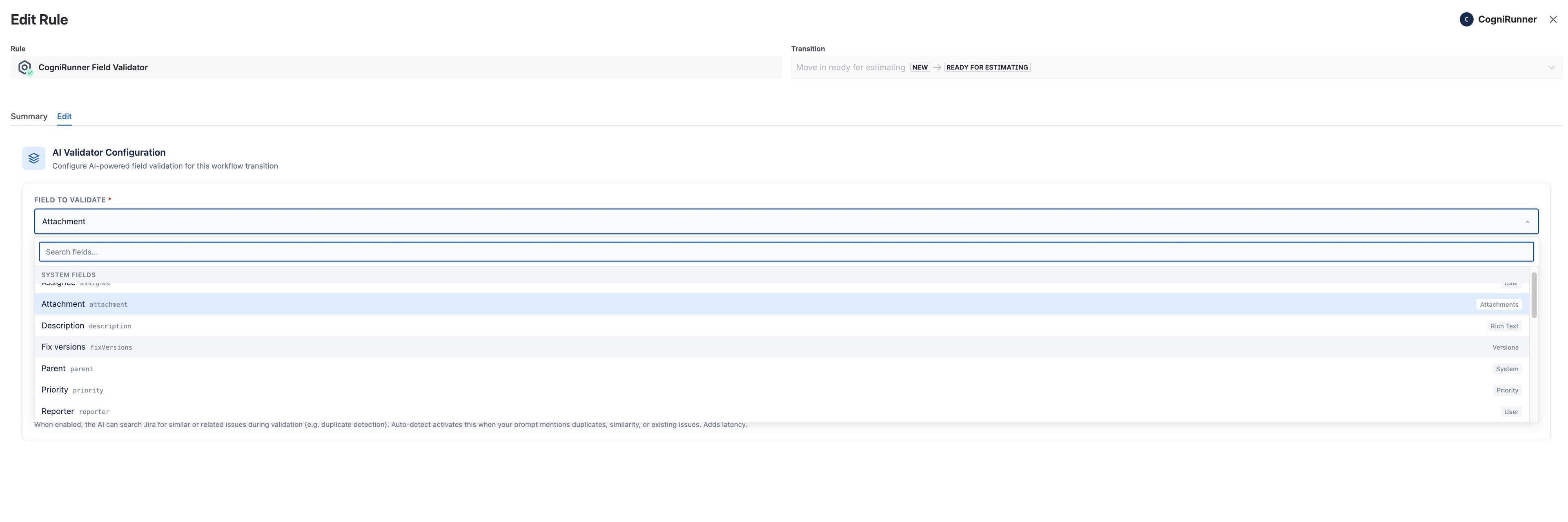
When you select Attachment, CogniRunner downloads and analyzes the actual content of attached files — not just the filename. See the Attachment Content Analysis section below for supported formats.
Writing Validation Prompts
The validation prompt is where you describe your quality criteria in natural language. The AI evaluates the field content against this prompt and returns a pass/fail result with reasoning.
Example Prompts
- “The description must include clear steps to reproduce, the expected behavior, and the actual behavior. Reject vague one-line descriptions.”
- “Acceptance criteria must be written in Given/When/Then format with at least one testable condition.”
- “Check whether a similar or duplicate issue already exists in this project, and explain the match if you block the transition.”
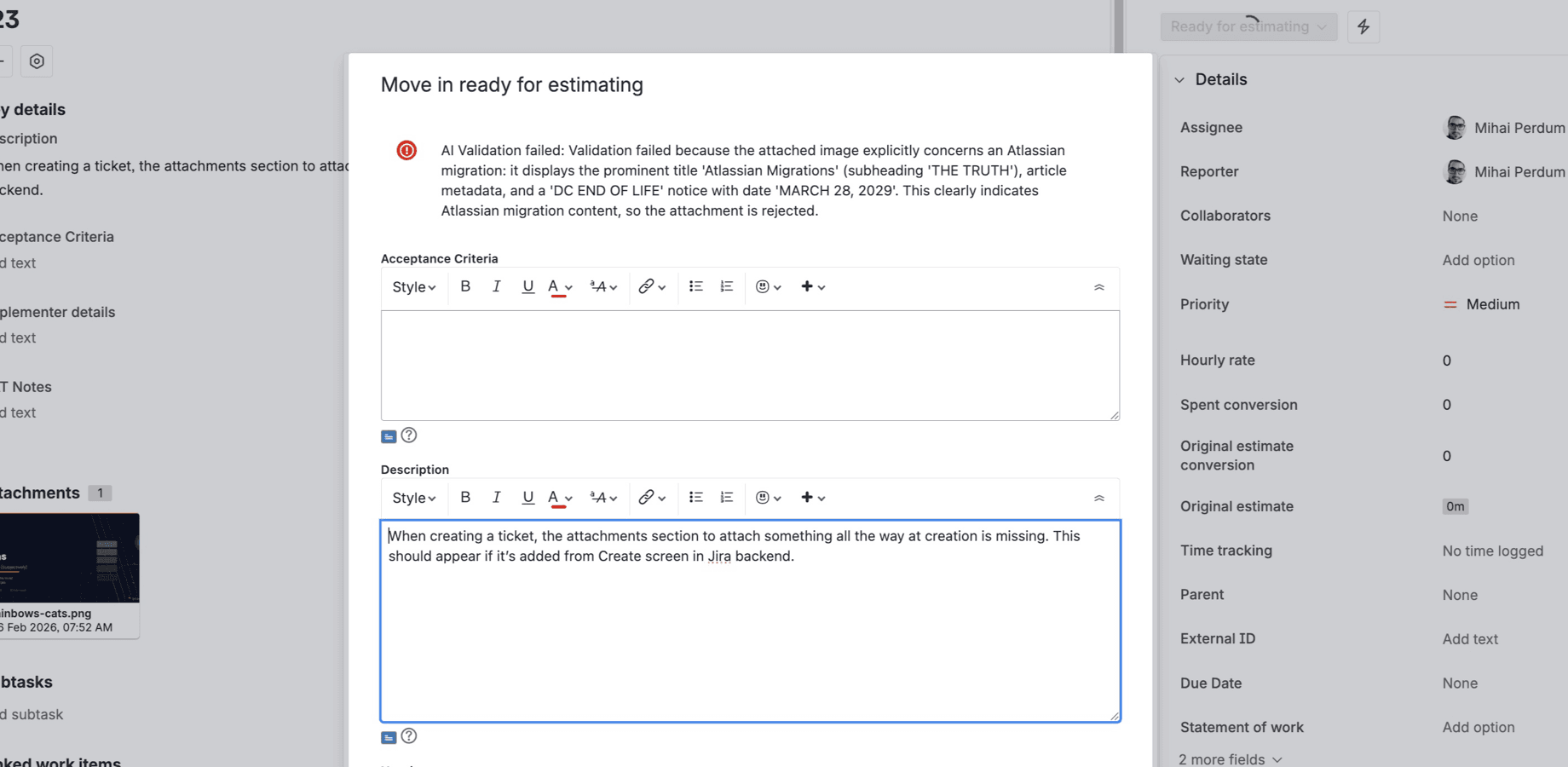
- “The attached design must be a UI screenshot or mockup, not a stock photo or unrelated image.”
- “Reject the transition if the field contains profanity, PII, or placeholder text such as 'TBD' or 'WIP'.”
The AI's response is always shown to the user when validation fails, so writing prompts that ask the AI to “explain clearly” will produce better error messages.
Agentic Validation & Duplicate Detection
When a rule needs context beyond the field itself, CogniRunner goes agentic: the AI autonomously builds and runs JQL queries against the issue's own project — over multiple rounds — to find similar or related work before deciding. The Jira Search setting has three modes.
This is the difference between “is this field filled in?” and “has someone already reported this?” — a question that previously needed a human to remember, search, and judge. Catching a duplicate at the point of creation saves the triage meeting, the merged tickets, and the work that gets done twice.
| Mode | Behavior |
|---|---|
| Auto-detect from prompt | CogniRunner analyzes your prompt text and automatically enables JQL search if it mentions duplicates, similarity, existing issues, or cross-referencing. This is the recommended setting. |
| Always enabled | JQL search is always active, regardless of prompt wording. The AI can run up to 3 rounds of JQL queries to find related issues. |
| Always disabled | No JQL search is performed. Validation is based solely on the field content and prompt. Fastest option. |
When agentic search is active, the AI generates and executes JQL queries to find related issues. It can run up to 3 rounds of queries, each returning up to 10 results, and is confined to the rule's own project for safety. The AI then uses what it finds to inform the decision — and the full query trail is logged.
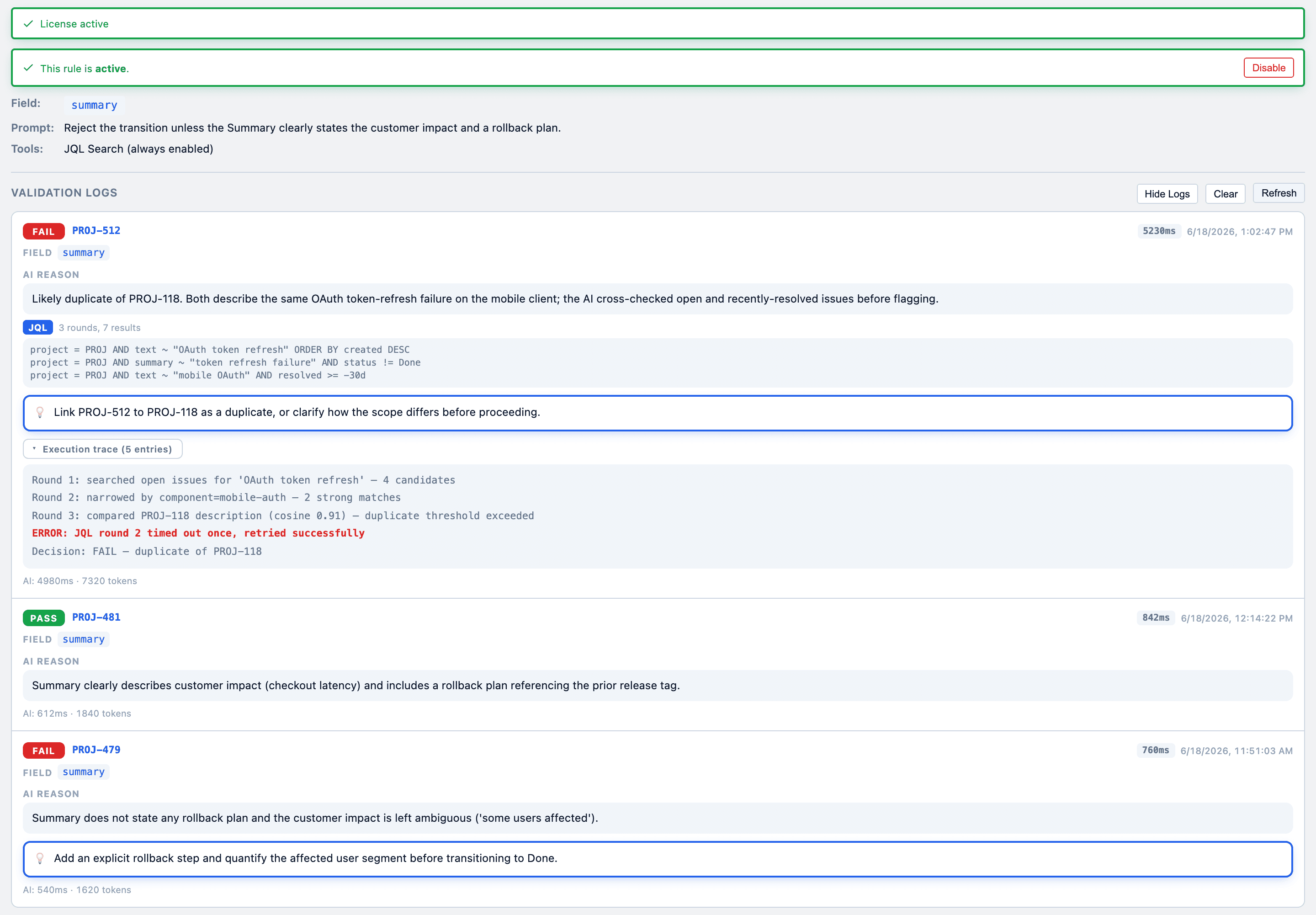
JQL search adds latency to the validation (up to 22 seconds in the worst case). For simple validations that don't need cross-referencing, use “Always disabled” for the fastest response.
Attachment Content Analysis
When you select Attachment as the field to validate, CogniRunner downloads and analyzes the actual content of attached files. The AI can read documents, spreadsheets, presentations, and understand images.
Every other workflow check treats an attachment as a checkbox: a file is present, so the gate passes. That's exactly how an empty template, a stock photo, or last sprint's spec sails through. Reading the file closes that gap — the requirement becomes the right, complete document, not any document.
Document Formats
| Format | Extensions |
|---|---|
.pdf | |
| Word | .docx, .doc |
| Rich Text | .rtf, .odt |
| Excel | .xlsx, .xls |
| CSV / TSV | .csv, .tsv |
| PowerPoint | .pptx, .ppt |
Image Formats (AI Vision)
| Format | Extensions |
|---|---|
| PNG | .png |
| JPEG | .jpg, .jpeg |
| GIF | .gif |
| WebP | .webp |
All image formats are processed via AI vision — the AI understands image content, not just metadata.
Unsupported file types are gracefully skipped — the AI receives metadata about skipped files (filename, size, type) so it can still reference them in its reasoning.
Validation in Action
When a user attempts a workflow transition, CogniRunner evaluates the configured field against your prompt. If validation fails, the transition is blocked and the AI's reasoning is displayed as an error message.
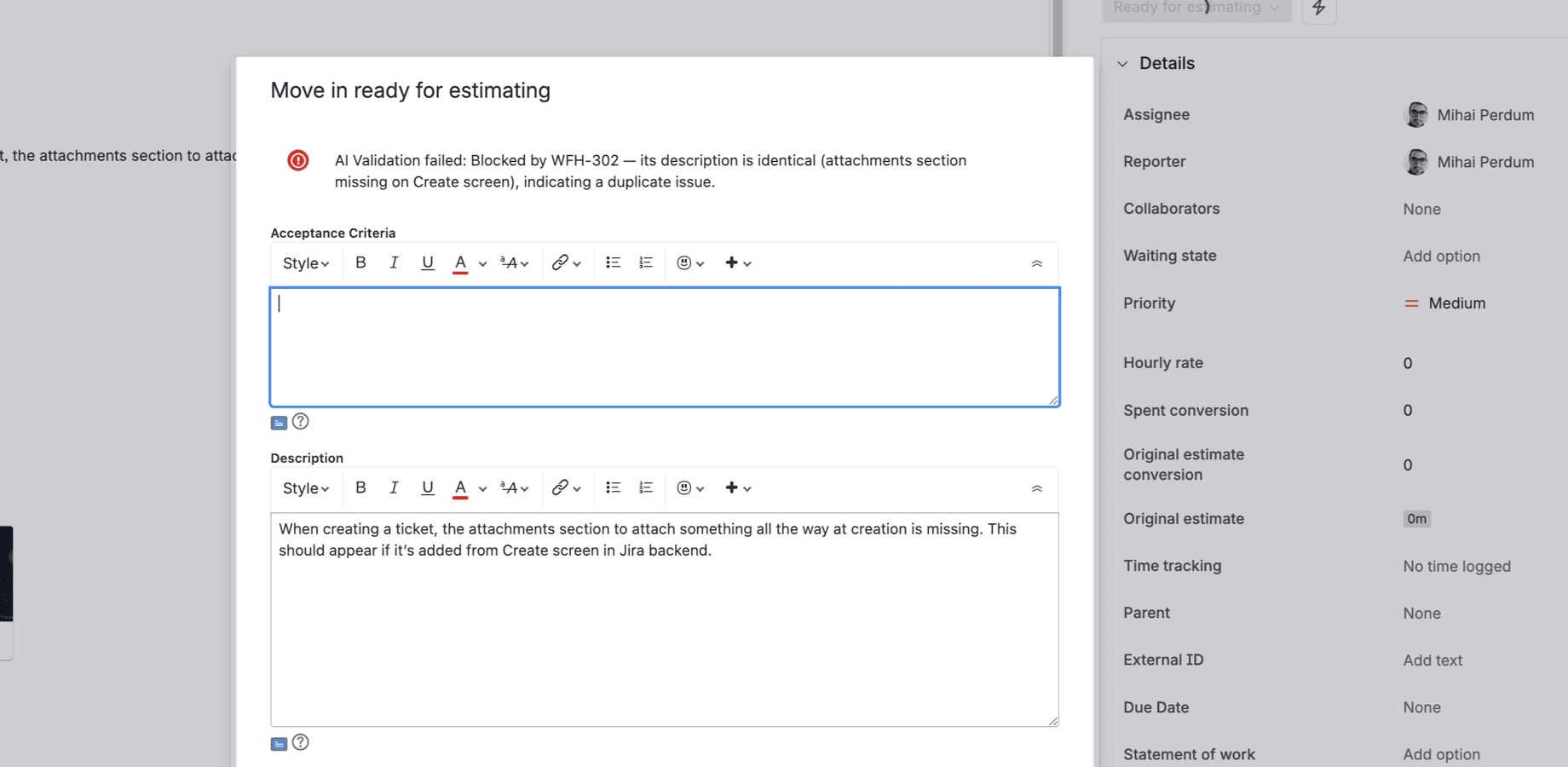
The error message always includes:
- A clear statement that AI Validation failed
- The specific reason for the failure
- When JQL search was used: references to related issue keys
- Enough context for the user to understand what needs to change
Semantic Post-Functions
Validators check; post-functions act. A semantic post-function runs after a transition: the AI reads a source field, decides whether to act, generates a value, and writes it to a target field — all described in plain English.
This is the busywork that quietly eats team hours: copying a summary into release notes, keeping an audit field current, turning a description into a checklist. Each is a tiny task no one wants to own — and the first thing dropped under pressure. Hand it to a post-function and it happens consistently, on every transition, with the reasoning logged.
Condition
When should this run? The AI evaluates the source field and decides to update or skip.
Action
What should it write? The AI generates a value to the rules you describe.
Target field
Where does it go? Schema-aware formatting writes the value into the field you choose.
Example Actions
- “After transition to Done, summarize the description into the Release Notes field.”
- “When moving to Code Review, extract the acceptance criteria into a checklist.”
- “On every transition, append the status change and timestamp to an audit-trail field.”
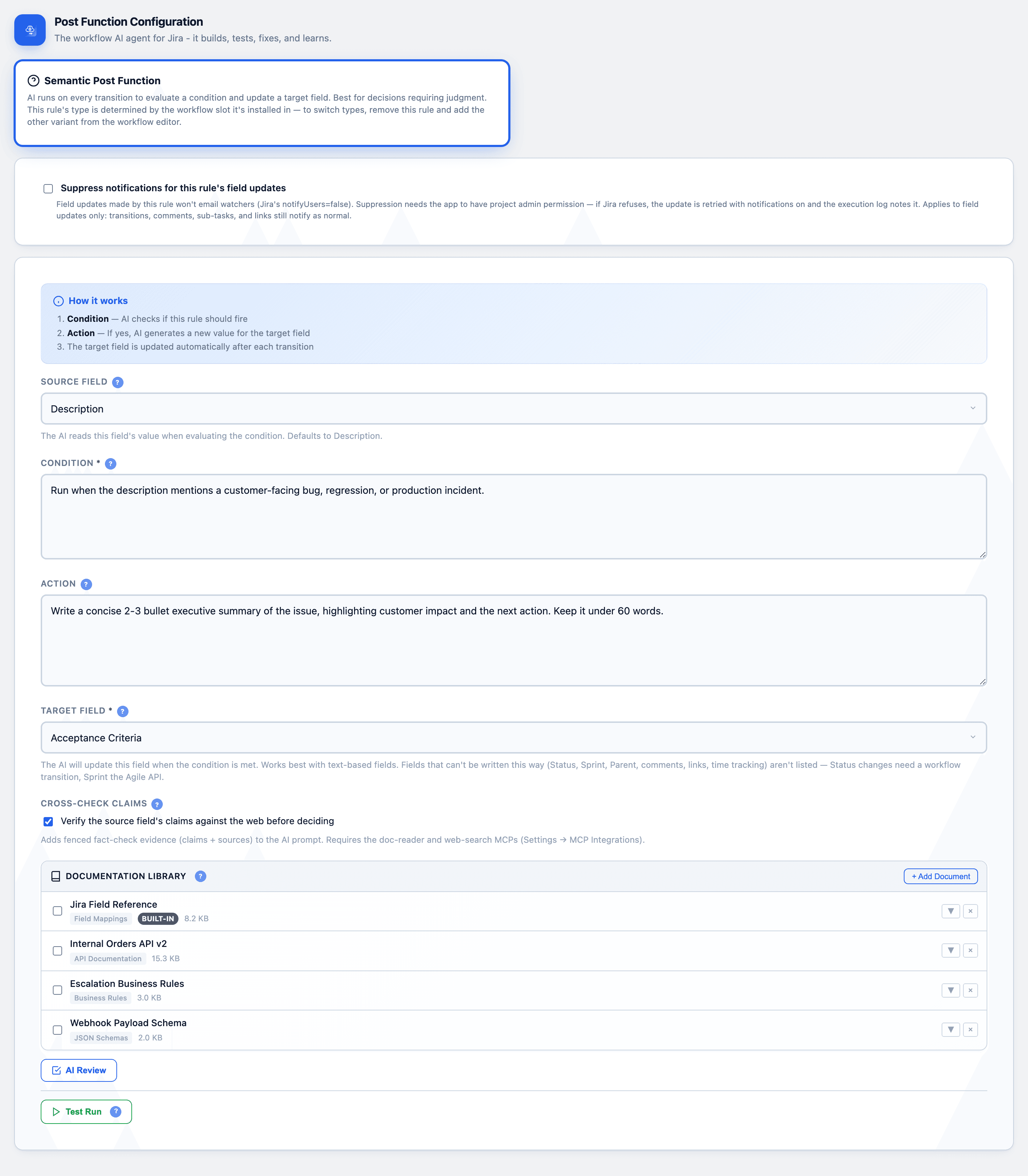
Semantic post-functions can also cross-check claims against your project before writing — useful when the generated value must be grounded in real issue data.
Static Post-Functions
For deterministic automation, the AI writes JavaScript once at setup. After that it runs on every transition at zero AI cost. Chain up to 50 steps with variable passing, a built-in code editor with autocomplete, and a sandboxed Jira API.
This is the bridge for platform engineers who'd otherwise reach for ScriptRunner: you describe the automation in plain English, the AI drafts the code, and you keep an editor open to read, tweak, and test it against real issue data before it ever touches production. The output is plain JavaScript you fully control — predictable on every run, with no AI in the hot path once published.
JQL Search
Query Jira for related issues.
Jira REST API
Read or write any Jira resource.
External API
Call allow-listed external services.
Confluence API
Create or update Confluence pages.
Debug Log
Inspect values while you build.
Tested & sandboxed
Per-step timeouts, retries, and a Test Run.
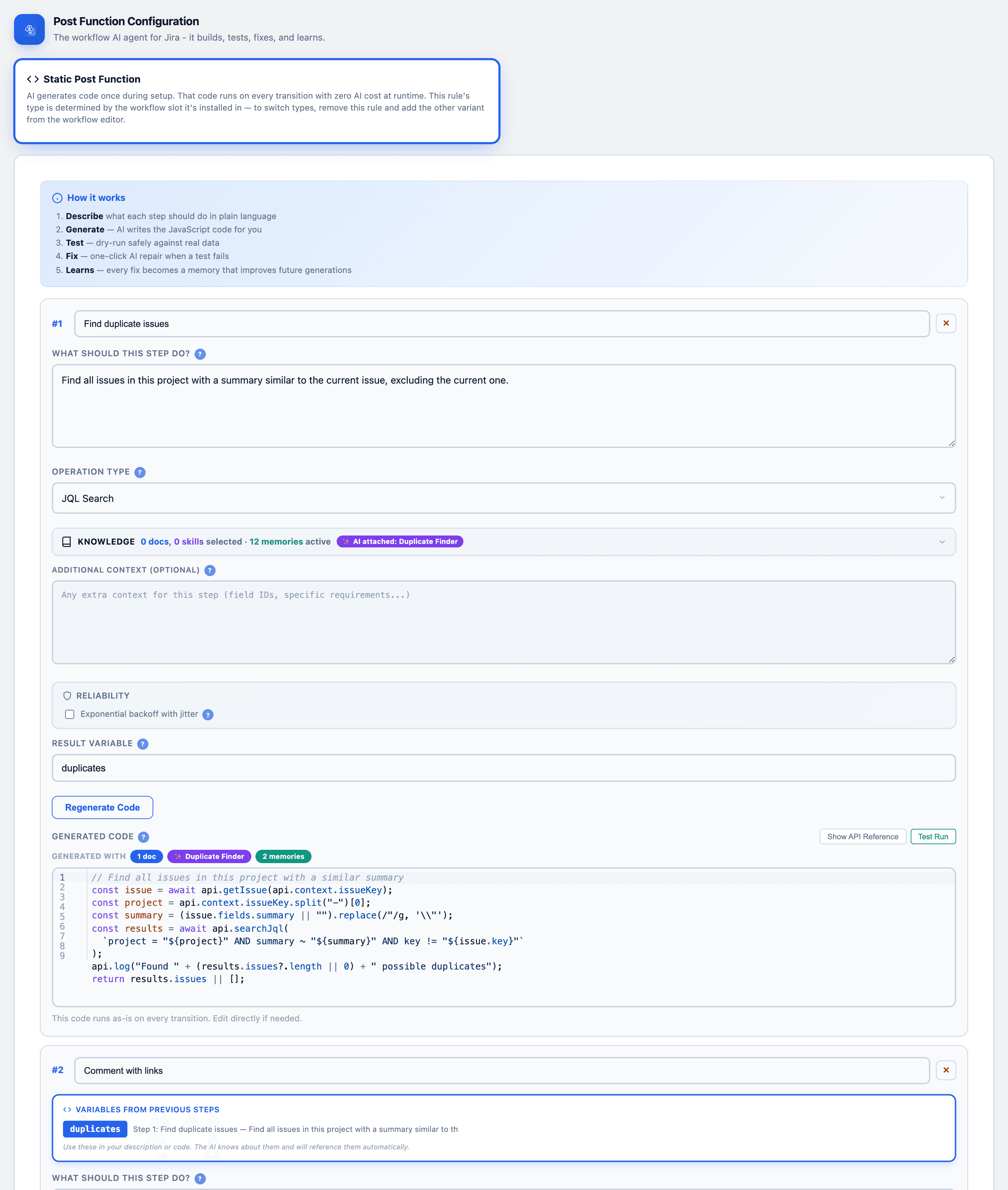
The same engine powers declarative AI actions — add an AI-drafted comment, create a sub-task or linked issue, or generate and attach a DOCX/PDF/PPTX — all configured in plain English, no code required.
Rule Management
Each CogniRunner rule can be enabled or disabled without removing it from the workflow. Useful for temporarily pausing validation during migrations, bulk updates, or troubleshooting.
Active Rule

Disabled Rule

Admin Panel
The CogniRunner Admin panel is the hub for every rule across your Jira workflows, with tabs for Rules, Documentation, Skills, Memories, Permissions, and Settings. Access it from the Jira Apps menu.
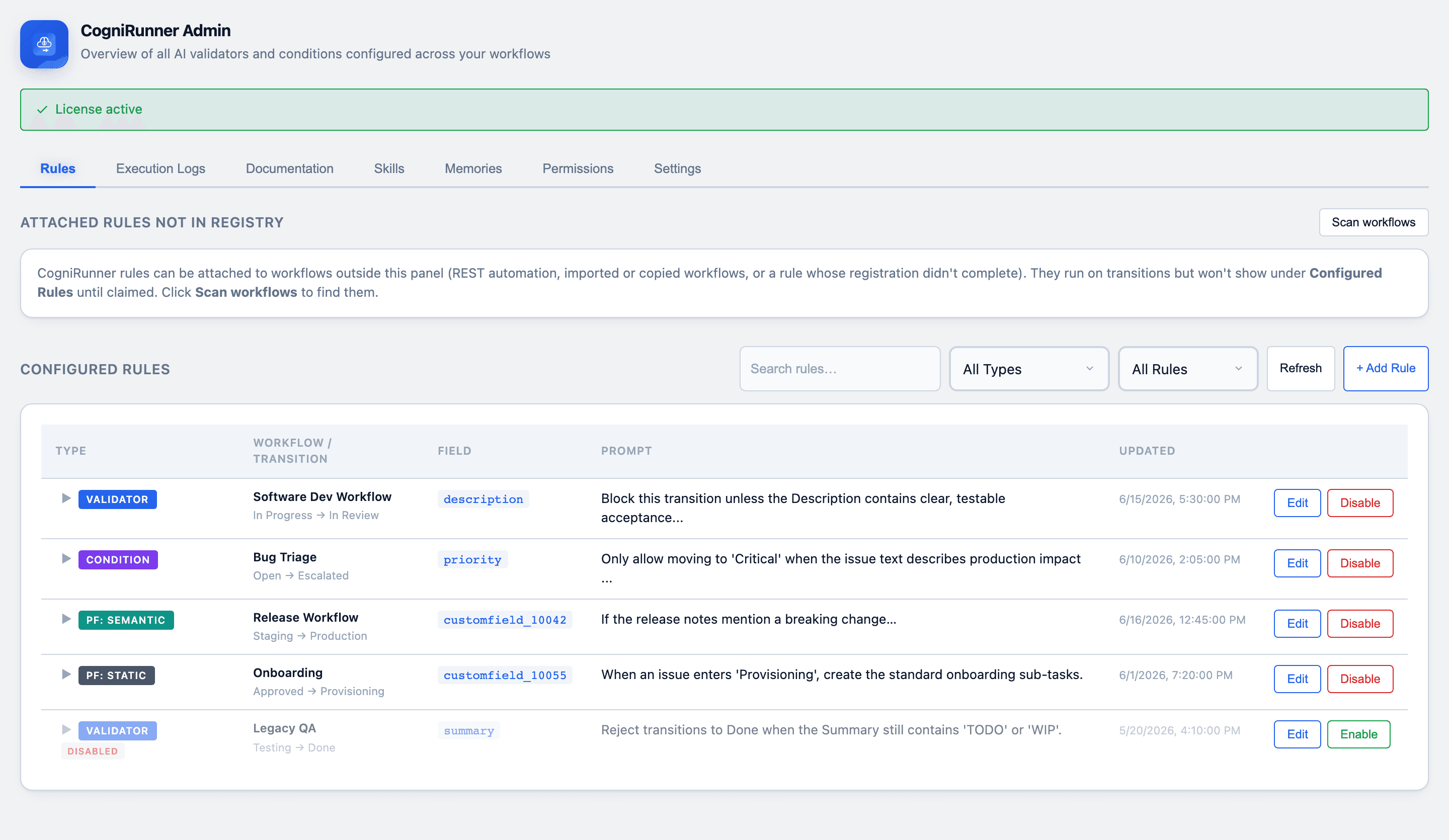
All rules, one place
Every validator, condition, and post-function across all workflows — filter by type or ownership, edit or disable inline.
Add Rule wizard
Create a rule without touching the workflow editor — pick project, workflow, transition, and type, then configure and publish.
Knowledge & Skills
A shared documentation library, reusable Skills, and learned Memories give the AI grounded, instance-specific context.
Permissions & Roles
Control who can do what with a role and scope model. Jira site admins always have access, and the last admin is protected from removal.
This is what lets a Jira admin let go safely. Team leads can author and tune their own workflow rules without an admin in the loop, and without the keys to everyone else's rules or the AI provider settings — so governance scales past a single gatekeeper.
Viewer
Can view rules and execution logs.
Editor
Can create, edit, disable, and manage rules and documents.
Admin
Full access, including permissions and AI provider settings.
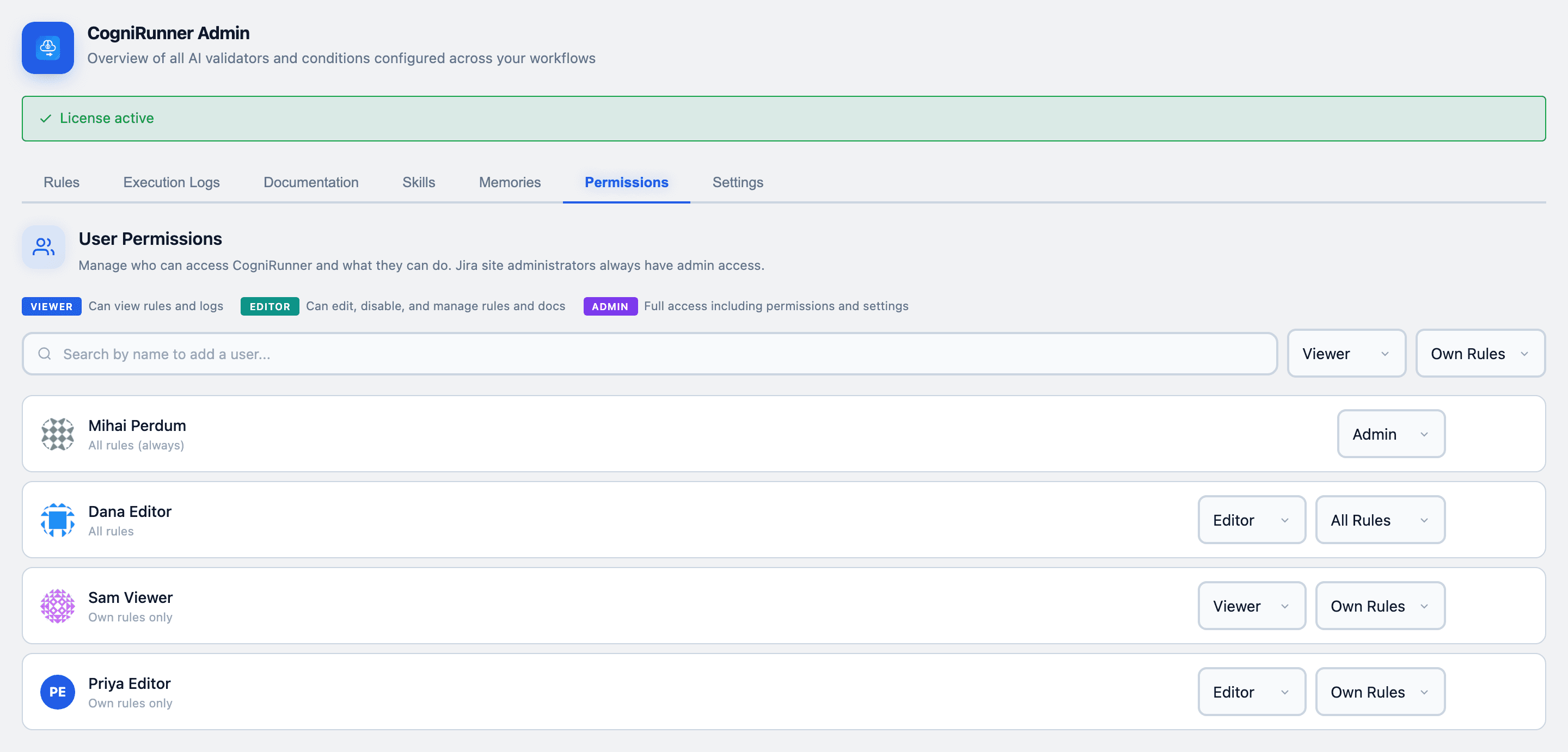
Scope narrows a role to a user's own rules or extends it to all rules, so you can delegate without handing over the whole app.
Documentation Library
Give the AI grounded context. Upload API docs, JSON schemas, business rules, or code snippets once, then attach them to any rule so the AI validates and generates against your standards — not just its training data.
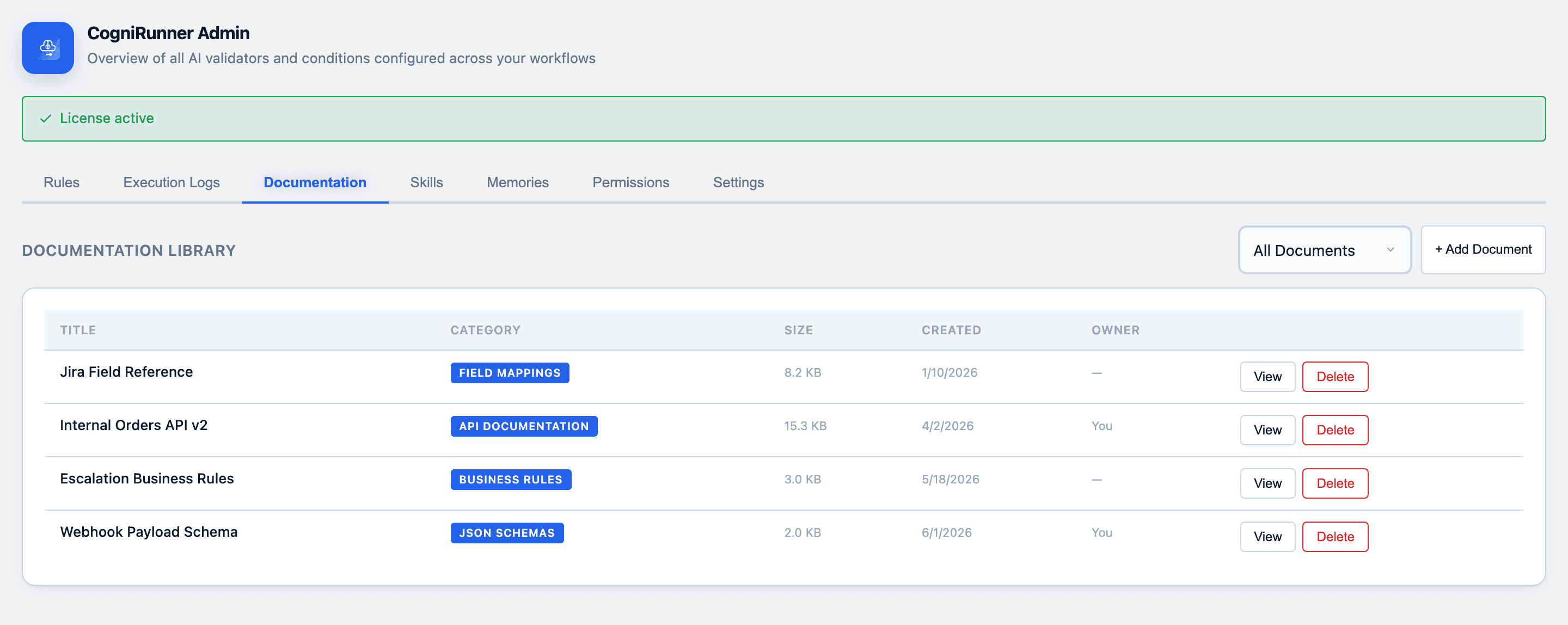
Attached documents are sent to the AI alongside the field content, so the model evaluates issues against your real API contracts, schemas, and business rules. The payoff: a rule can enforce “this payload matches our v2 API schema” or “this follows our naming convention” — standards the AI has no way to know from training data alone, written down once and reused across every rule that needs them.
Skills & Memories
CogniRunner doesn't just run on a model's generic knowledge — you teach it. Skills are reusable instruction packs; Memories are facts it learns about your instance. Both are fed into the AI so its output fits how your Jira actually works.
Skills — reusable instruction packs
Teach the code generator domain-specific patterns — Jira REST calls, ADF formatting, duplicate detection. Attach a skill to a rule, or let CogniRunner auto-match by the step's description. Ships with built-ins; add your own once and reuse them everywhere.
Memories — what it learns about your instance
Short facts about this Jira — custom field IDs, option lists, workflow quirks — captured once and injected into every generation, so the AI stops repeating the same mistakes. Add them yourself or let it learn as it runs.
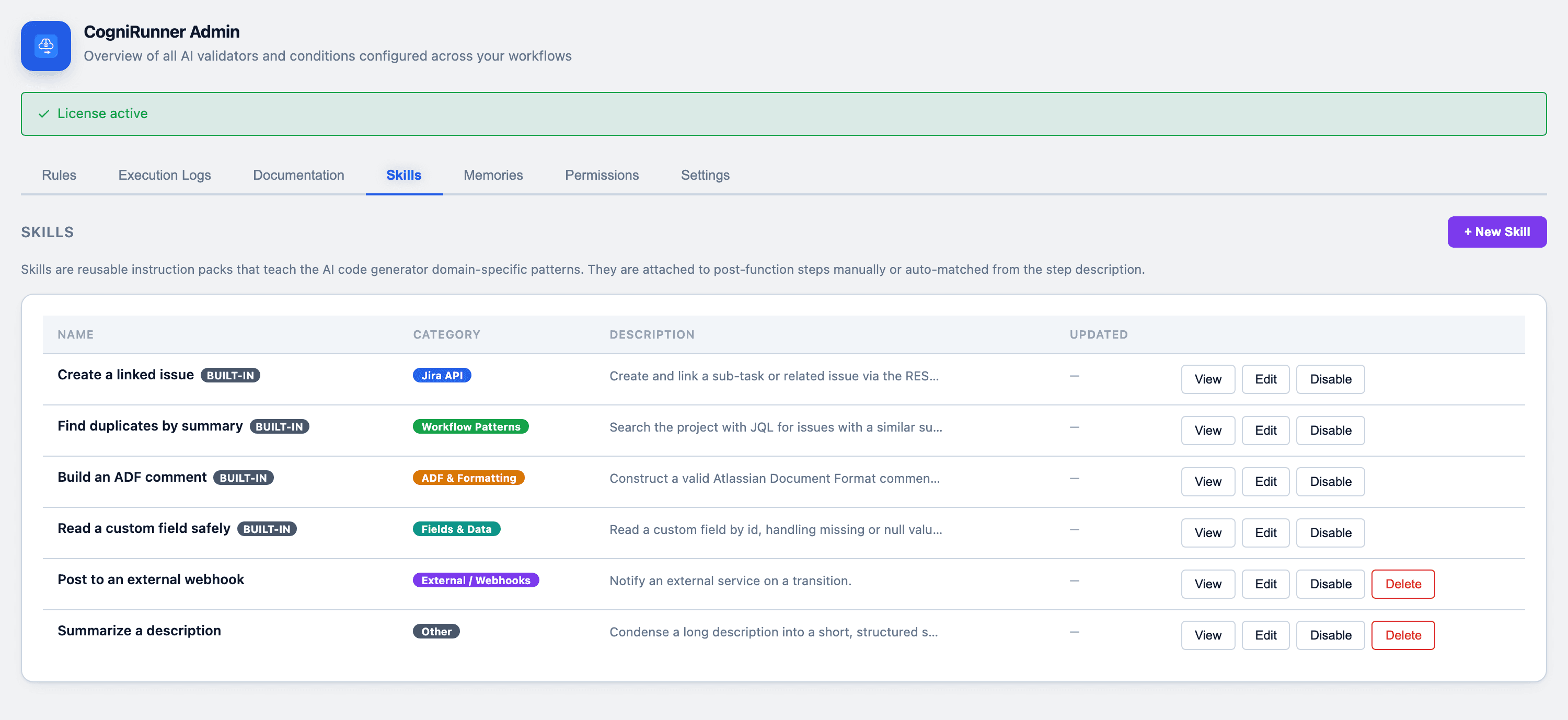
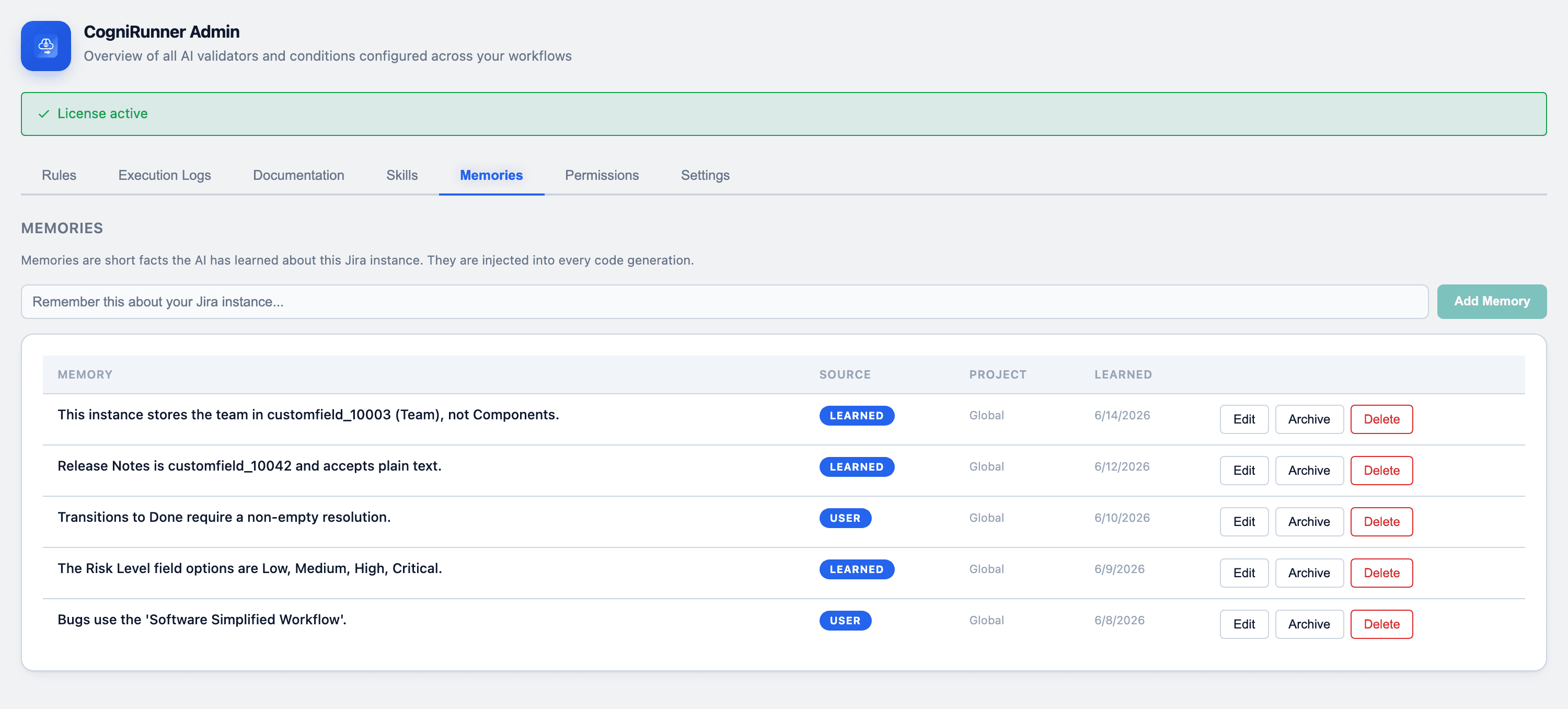
Together, Skills and Memories turn a general model into one that already knows your field IDs, your conventions, and your past fixes — written down once and reused across every rule.
MCP Integrations
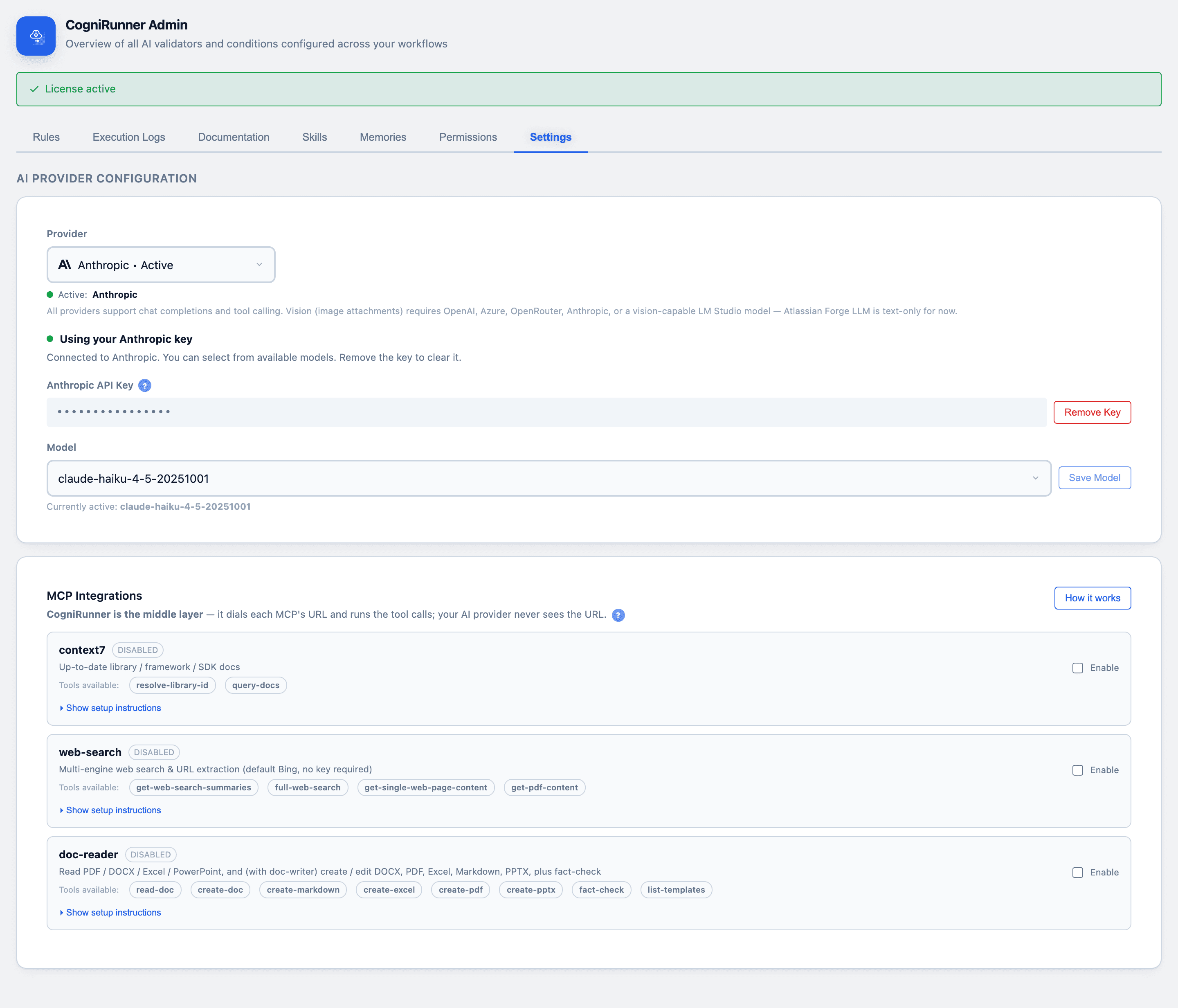
CogniRunner sits between your AI and the outside world. Through the Model Context Protocol (MCP), a rule can call real tools — and CogniRunner brokers every call, so your AI provider never sees the tool's URL or credentials.
context7
Live library & SDK docs. The AI checks code against the current documentation for any library — not the model's training cutoff.
resolve-library-id · query-docs
web-search
Real-time web search plus page and PDF extraction, so a rule can research a topic or verify a claim while it runs.
full-web-search · get-page-content · get-pdf-content
doc-processor
Read attached files and generate real DOCX, PDF, Excel & PPTX — a rule can produce a deliverable and attach it to the issue.
read-doc · create-pdf · create-docx · create-excel
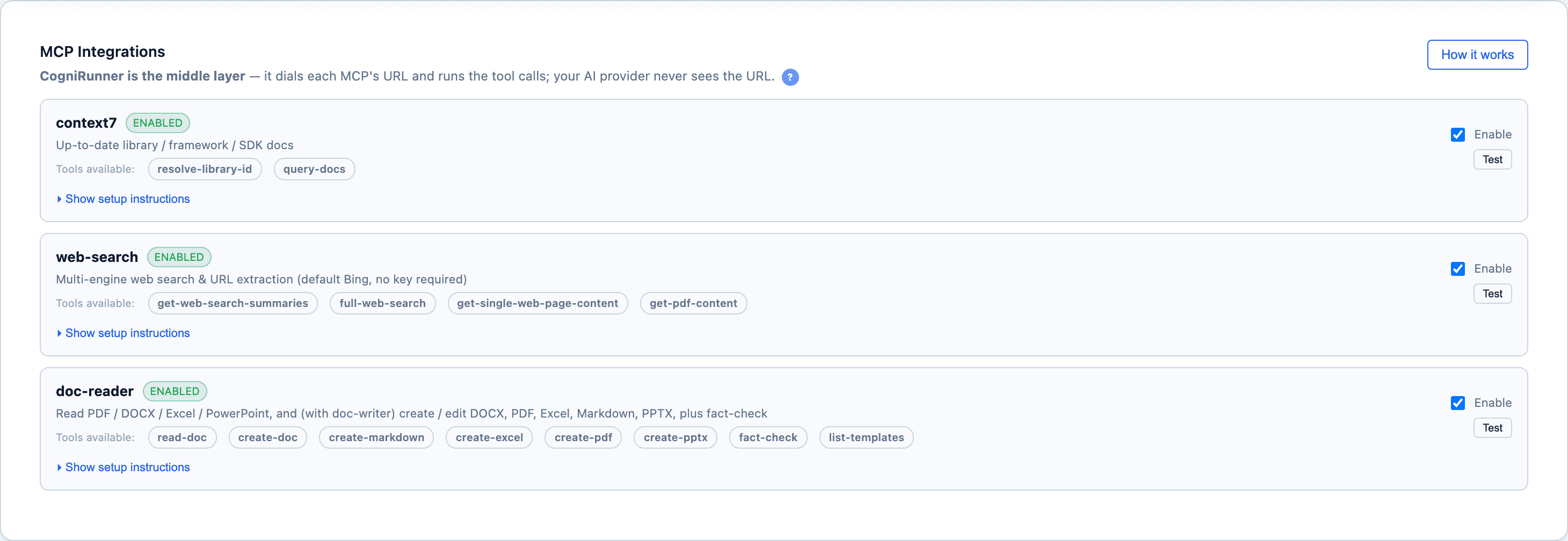
Every MCP call runs through CogniRunner inside Atlassian Forge — your AI provider receives only the tool's result, never the URL, token, or your data en route.
Execution Logs
Every run — validator, condition, or post-function — is logged with full context: pass/skip/error status, the AI's reasoning, the JQL it ran, and an execution trace. Logs are available in both the Admin panel and the individual rule view.
This is what makes AI-in-the-loop something you can defend rather than something you have to trust blindly. When a user asks “why was I blocked?” the answer is one entry away, verbatim — the field it read, the queries it ran, the verdict, and a suggested fix. Tuning a rule stops being guesswork.
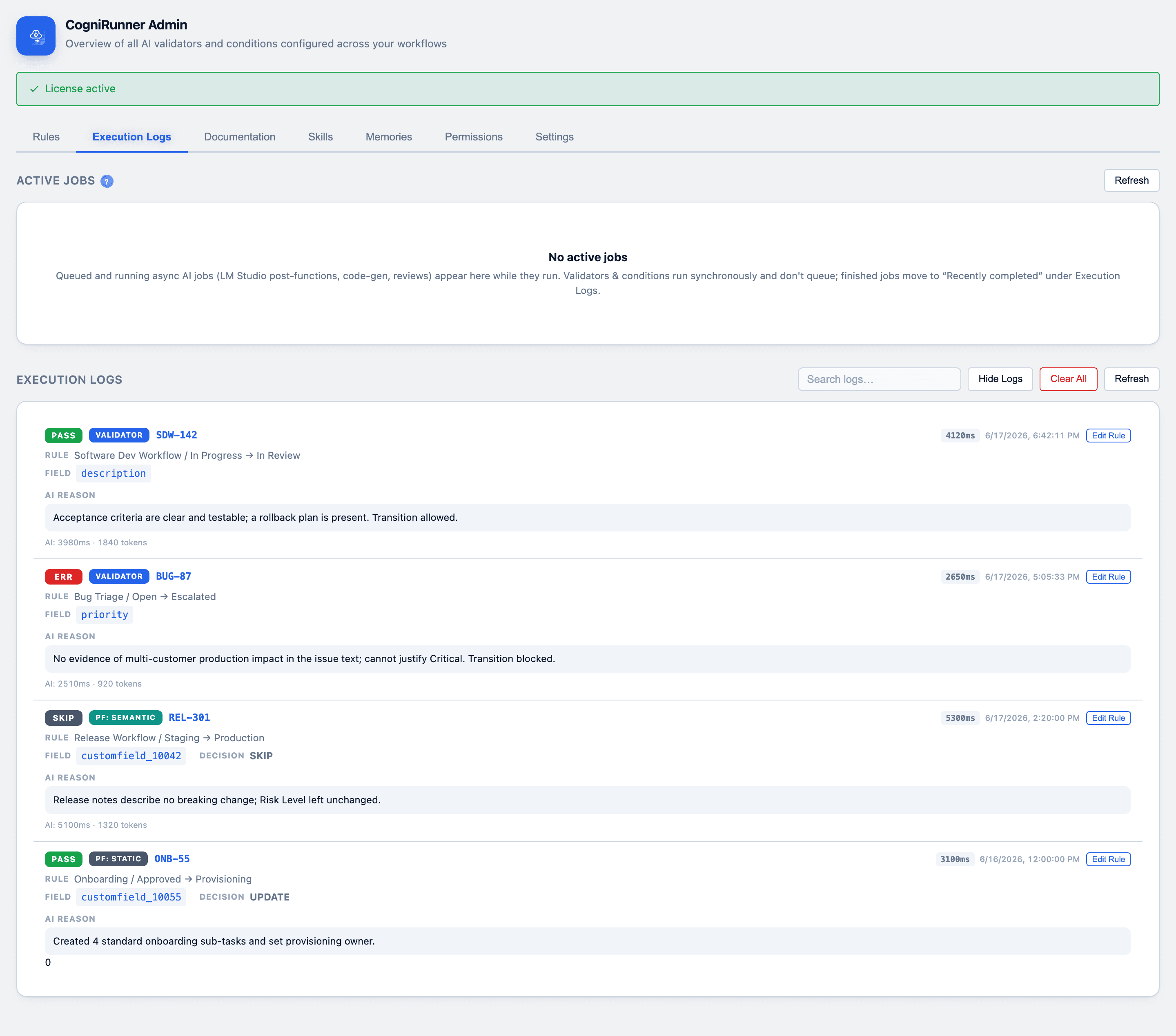
Each log entry includes:
Status — PASS, SKIP, or ERR badge
Rule type — Validator, Condition, or Post-Function
Issue key & duration — Which issue ran, and how long it took
AI reasoning — The full explanation from the AI
JQL queries — Queries executed during agentic search
Trace & recommendations — Step-by-step trace and suggested fixes
Logs are stored in Forge storage with a maximum of 50 entries (FIFO — oldest entries are removed when the limit is reached).
Supported Jira Field Types
CogniRunner extracts readable text from any Jira field type and sends it to the AI for validation. All field values are converted to plain text before evaluation.
| Category | Field Types |
|---|---|
| Text | Single-line text, Multi-line text, URL |
| Rich Text | Description, Comments, and other ADF fields — full text extraction from rich content |
| Select | Select list (single/multi), Radio buttons, Checkboxes, Cascading select |
| People | User picker (single/multi), Group picker (single/multi), Reporter, Assignee |
| Date & Time | Date picker, Date/Time picker |
| Numeric | Number, Time tracking (original estimate, remaining estimate, time spent) |
| System | Priority, Status, Resolution, Issue type, Labels, Components, Versions, Sprint |
| Reference | Issue links, Parent issue, Project picker |
| Files | Attachments — with full content analysis |
| Third-Party | Checklist for Jira, Xray, Assets/Insight, ScriptRunner, Tempo, Elements Connect, and more |
| Custom | Any custom field with a readable value — extracted generically |
Limits & Constraints
| Limit | Value | Notes |
|---|---|---|
| Max attachment size (per file) | 10 MB | Files larger than 10 MB are skipped |
| Max total attachment size | 20 MB | Combined size across all attachments per validation |
| Validation timeout | 25 seconds | Forge function time limit; agentic mode budgets 22 seconds |
| JQL search rounds | 3 rounds max | Each round can execute multiple JQL queries |
| JQL results per query | 10 issues | Top 10 matching issues returned per query |
| Static post-function steps | 50 steps | Chained operations per static post-function |
| Execution log history | 50 entries | Oldest entries removed when limit is reached (FIFO) |
| Prompt log truncation | 200 characters | Field values stored in logs are truncated for storage |
Attachments that exceed the size limit or use unsupported formats are gracefully skipped. The AI still receives metadata about skipped files and can reference them in its reasoning.
Multi-Provider AI (Bring Your Own Key)
CogniRunner ships with no embedded API key. Connect your own key from any supported provider — or use the zero-key Atlassian Forge LLM that runs inside Atlassian's platform. Each provider stores its own key, so switching never loses your settings.
For a security or platform team, this answers the first question they'll ask: where does our issue data go? The answer is wherever you decide — your own provider account under your existing data agreement, or never leaving Atlassian at all with the Forge LLM. No third party sits between Jira and the model, and switching providers later is a dropdown, not a migration.
First to integrate
Run AI locally with LM Studio
The first Jira app to integrate LM Studio — inference and your field data stay on your own hardware. Absolute privacy and zero per-token cost, for the security- and budget-conscious.
Among the first
Zero-key Atlassian Forge LLM
One of the first apps to ship the Atlassian Forge LLM provider — AI that runs inside Atlassian's platform with no API key and no external egress.
OpenAI
Your OpenAI API key
Anthropic
Claude models, your key
Azure OpenAI
Your Azure deployment
OpenRouter
One key, many models
AWS Bedrock
Converse API, your account
Atlassian Forge LLM
Zero-key — runs inside Forge
Your field and attachment content is sent only to the AI provider you configure. With the Forge LLM provider, requests stay within Atlassian's platform — no external egress.
Try it on your own workflow
Install from the Marketplace, point it at a transition, and write your first rule in plain English. Open source under AGPL-3.0 — the full source is on GitHub.