Forge gives you two clean ways to call an LLM: Atlassian-hosted Forge LLMs (no egress, keeps the Runs on Atlassian badge) or your own provider via declared egress.
The real work is grounding and control — feed the model the right context, and wrap every call in fail-open, time-boxed, logged logic.
Workflow validators, conditions and post-functions are the natural seams to drop AI into Jira.
Native Jira validators check structure: required, not empty, matches a regex. They cannot tell you whether a bug report is actually reproducible, whether a description is a likely , or whether release notes describe a . That gap — between structure and — is exactly where a language model earns its keep.
This guide walks through building an LLM-powered Atlassian Forge app that adds semantic intelligence to Jira workflows. We'll use CogniRunner — a production Forge app — as the running example, so every pattern here is one that ships.
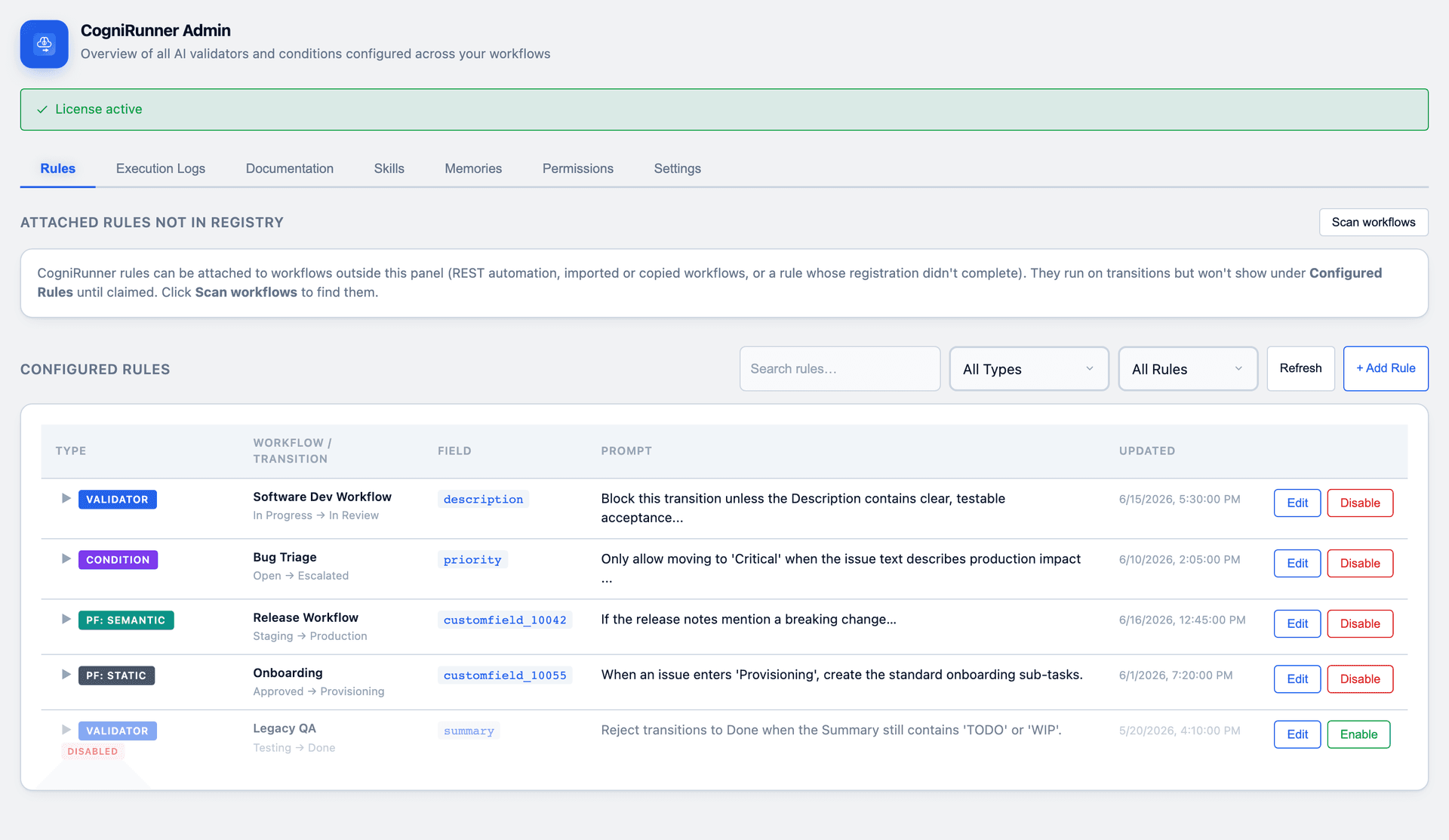
CogniRunner Admin — the Rules tab
Note
Everything below runs on Forge's hosted platform — no servers, no infrastructure. If you stick to Atlassian-hosted models, your app keeps its Runs on Atlassian eligibility, meaning customer data never leaves Atlassian's cloud.
Two ways to call an LLM from Forge
Before any code, pick how the model gets called. Forge gives you two first-class options (plus Rovo for conversational agents):
Approach
How it works
Best when
Forge LLMs API
Call Atlassian-hosted Claude models with @forge/llm. No egress, no keys.
You want the simplest path and the Runs on Atlassian badge.
Bring Your Own Key (BYOK)
Declare egress and call OpenAI / Anthropic / Azure / Bedrock with @forge/api.
You need a specific model, vision, or the customer's own account.
Rovo Agent
Register a rovo:agent that lives inside Atlassian's AI chat.
You want a conversational teammate, not a workflow rule.
4 rows × 3 columnsHeader row enabled
CogniRunner supports both of the first two — the Forge LLMs API for a zero-config start, and BYOK across OpenAI, Anthropic, Azure OpenAI, OpenRouter and AWS Bedrock for teams that want a specific model or vision support.
The architecture
An LLM-in-Jira app has three moving parts:
A trigger — a workflow validator, condition, or post-function fires on a transition.
A context gather — read the issue's fields (and, optionally, attachments and related issues).
An LLM call — send that context to a model with a plain-English instruction, then act on the result.
1
Install the CLI
npm install -g @forge/cli then forge login with an API token.
2
Create the app
forge create and pick a Jira template (UI Kit).
3
Add the modules
declare your validator/post-function and the llm module in manifest.yml.
4
Deploy
forge deploy then forge install onto a Jira site you administer.
Step 1 — Declare the modules
The manifest.yml is the heart of a Forge app. Here we register a workflow validator and switch on the Forge LLMs API. The llm module is all it takes to unlock Atlassian-hosted models.
manifest.ymlyaml
1modules:2jira:workflowValidator:3-key: ai-validator
4name: AI Validator
5function: validate
6llm:7-key: cognirunner-llm
8model:9- claude
10function:11-key: validate
12handler: index.validate
13app:14runtime:15name: nodejs24.x
16id: ari:cloud:ecosystem::app/<your-app-id>
Success
Adding the llm module does not cost you the Runs on Atlassian badge — Atlassian hosts the model inside its own platform. LLM usage is billed to you (the developer) on your Forge bill; it's usage-based, so you only pay for calls you actually make.
Step 2 — Call the model
With the llm module declared, install the SDK and call a model in a few lines. The API mirrors the familiar chat-completions shape.
bash
1npminstall @forge/llm
src/index.tsts
1import{ chat }from'@forge/llm';23asyncfunctionaskModel(fieldValue:string){4const res =awaitchat({5 model:'claude-sonnet-4-5-20250929',6 messages:[7{8 role:'system',9 content:10'You review Jira fields. Reply with ALLOW or BLOCK, then one short reason.',11},12{ role:'user', content: fieldValue },13],14 max_completion_tokens:256,15 temperature:0,16});1718return res.choices[0].message.content asstring;19}
Tip
Set temperature: 0 for validation and classification — you want the same verdict for the same input every time. Save the creative temperatures for drafting release notes.
The BYOK alternative
Prefer your own provider, or need image/vision support? Declare the domain in permissions.external.fetch.backend and call it with @forge/api. Calls to any domain you haven't declared are rejected — that's the egress model doing its job.
1import api from'@forge/api';23const res =await api.fetch('https://api.anthropic.com/v1/messages',{4 method:'POST',5 headers:{6'x-api-key': apiKey,// pulled from secure storage — never hard-code7'anthropic-version':'2023-06-01',8'content-type':'application/json',9},10 body:JSON.stringify({11 model:'claude-sonnet-4-5',12 max_tokens:512,13 messages:[{ role:'user', content: fieldValue }],14}),15});16const data =await res.json();
Step 3 — Turn it into a Jira validator
A jira:workflowValidator function runs when a user tries a transition. Return result: false with a message and Jira blocks the move, showing the user why — in the model's own words.
src/index.tsts
1import{ chat }from'@forge/llm';23exportconstvalidate=async(payload:{ issue:{ fields: Record<string,unknown>}})=>{4const description =String(payload.issue.fields.description ??'');56try{7const res =awaitchat({8 model:'claude-sonnet-4-5-20250929',9 temperature:0,10 messages:[11{ role:'system', content:'Reply exactly ALLOW or BLOCK:<reason>. Block vague bug reports.'},12{ role:'user', content: description },13],14});15const verdict =String(res.choices[0].message.content).trim();1617if(verdict.startsWith('BLOCK')){18return{ result:false, errorMessage: verdict.replace(/^BLOCK:?\s*/,'')};19}20return{ result:true};21}catch(err){22// Fail OPEN — never let an AI hiccup lock a team out of their workflow.23console.error('AI validator error, allowing transition:', err);24return{ result:true};25}26};
Configuring an AI validator in CogniRunner
Warning
Two rules you cannot skip in production:
Fail open. If the model errors or times out, allow the transition. A workflow that locks up because an API blipped is worse than one that occasionally misses.
Mind the clock. A synchronous Forge function has a ~25-second ceiling. Keep validator prompts tight; push anything heavier to the async queue (Step 6).
Step 4 — Act after a transition
Validators gate; post-functionsdo. A semantic post-function reads a source field, decides whether to act, and writes a target field — for example, turning a closed issue's notes into release-ready copy.
Configuring a semantic post-function
The shape is the same as the validator: gather context → chat() → write the result back with the Jira REST API. The only new idea is where the output goes — a field update instead of an allow/block decision.
Step 5 — Ground the model
A raw LLM guesses. A grounded one cites. The single biggest quality lever is the context you feed in. CogniRunner grounds decisions two ways:
A documentation library — upload API specs, JSON schemas, or business rules once, then attach them to any rule so the model validates against your standards, not its training data.
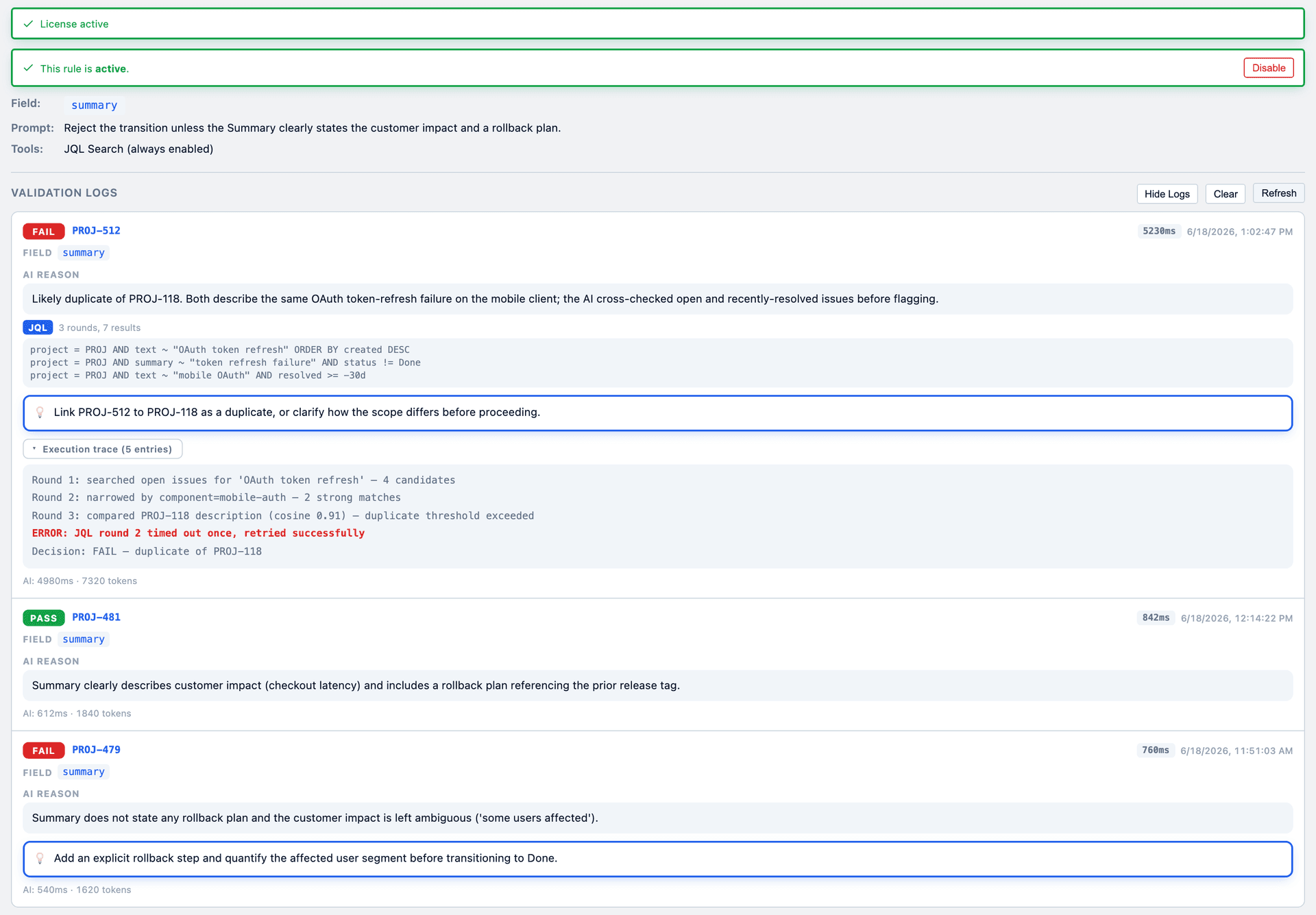
Agentic Jira search — for duplicate detection, the model autonomously writes and runs JQL against the issue's own project, up to three rounds, before deciding.
Agentic JQL search, fully logged
Tip
Grounding beats prompt-engineering. Three relevant lines of context shrink hallucinations far more than another paragraph of instructions. Give the model the schema, the related issues, the house style — then ask your question.
Step 6 — Production hardening
A demo calls the model and prints the answer. A product survives Mondays. Three patterns separate them:
Bring Your Own Key, stored securely. Keep provider keys in Forge's encrypted storage — never in code or plain config. Read them at call time.
src/keys.tsts
1import{ kvs }from'@forge/kvs';23await kvs.setSecret('anthropic-key', apiKey);// write once, encrypted at rest4const apiKey =await kvs.getSecret('anthropic-key');// read at call time
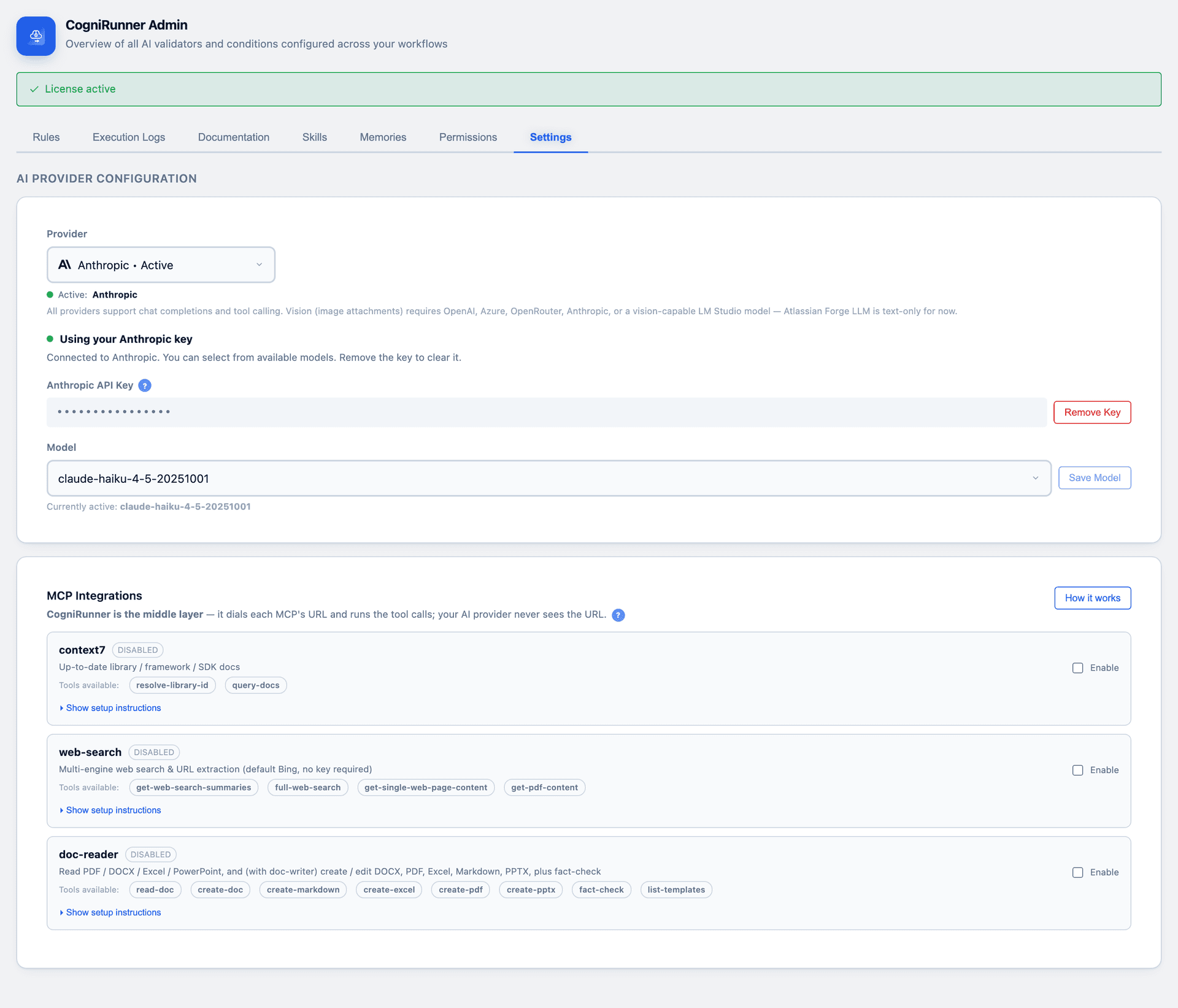
Multi-provider BYOK settings
Offload long work. Agentic loops and big documents blow past 25 seconds. Hand them to the async events queue and report back when done.
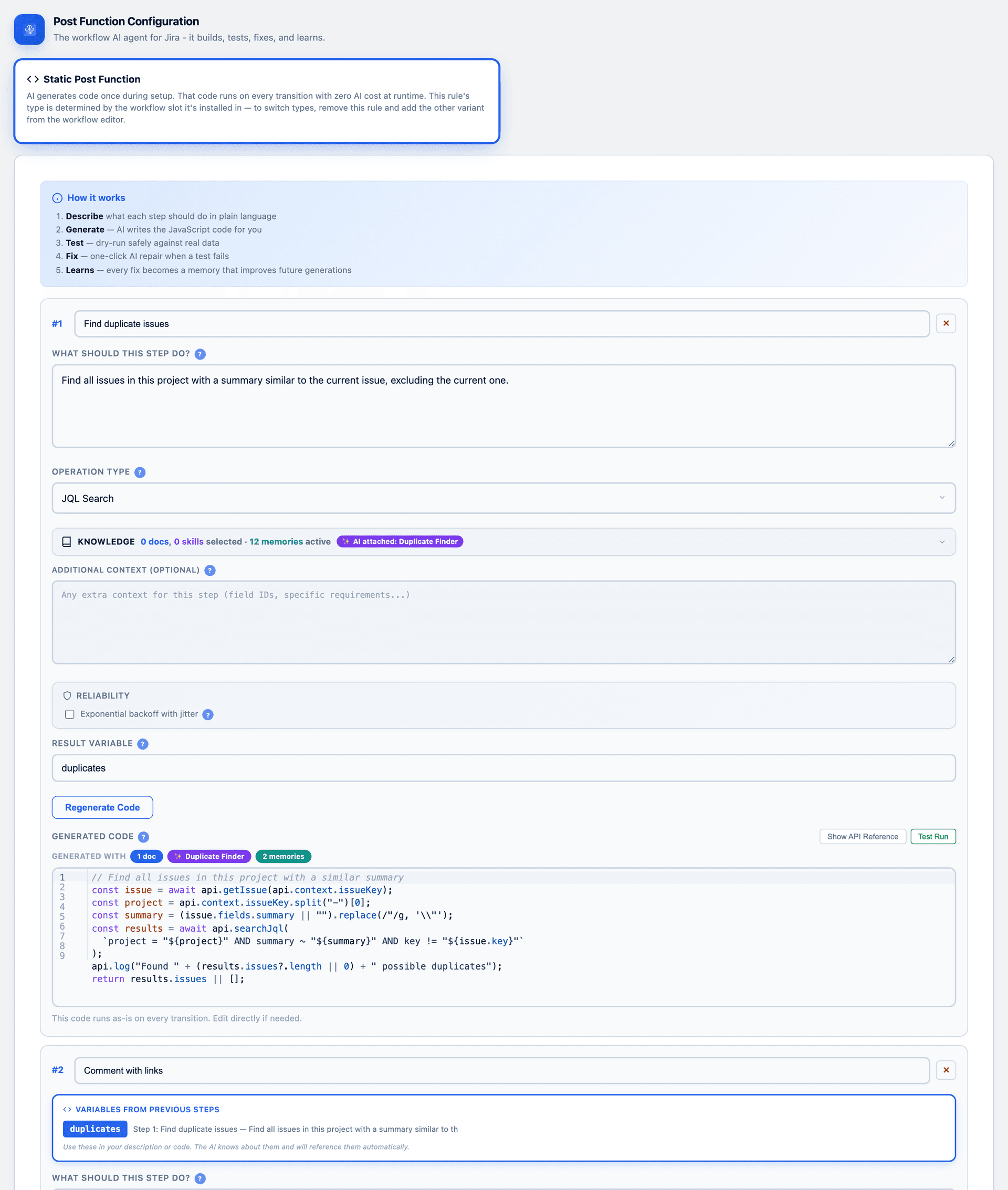
Optimize the hot path. Not every transition needs a live model call. CogniRunner's static post-functions have the AI write JavaScript once, then run that generated code at zero AI cost on every future transition — chaining sandboxed steps that pass variables between them.
Static post-functions: AI writes the code once
Log everything. Every run — pass, skip, or error — should record the verdict, the reasoning, and any tools the model used. It's how you debug, audit, and earn trust.
Where to go next
You now have the whole picture: declare a module, call a model, gate or act on a transition, ground the decision, and harden it for production. The same three-part shape — trigger → context → LLM — scales from a one-field validator to an agentic duplicate detector.
APIs evolve — the Forge LLMs API is in Preview. Always check the live Atlassian docs linked above for the latest model identifiers and method signatures before you ship.